Free tool
K-factor calculator for sheet metal bending
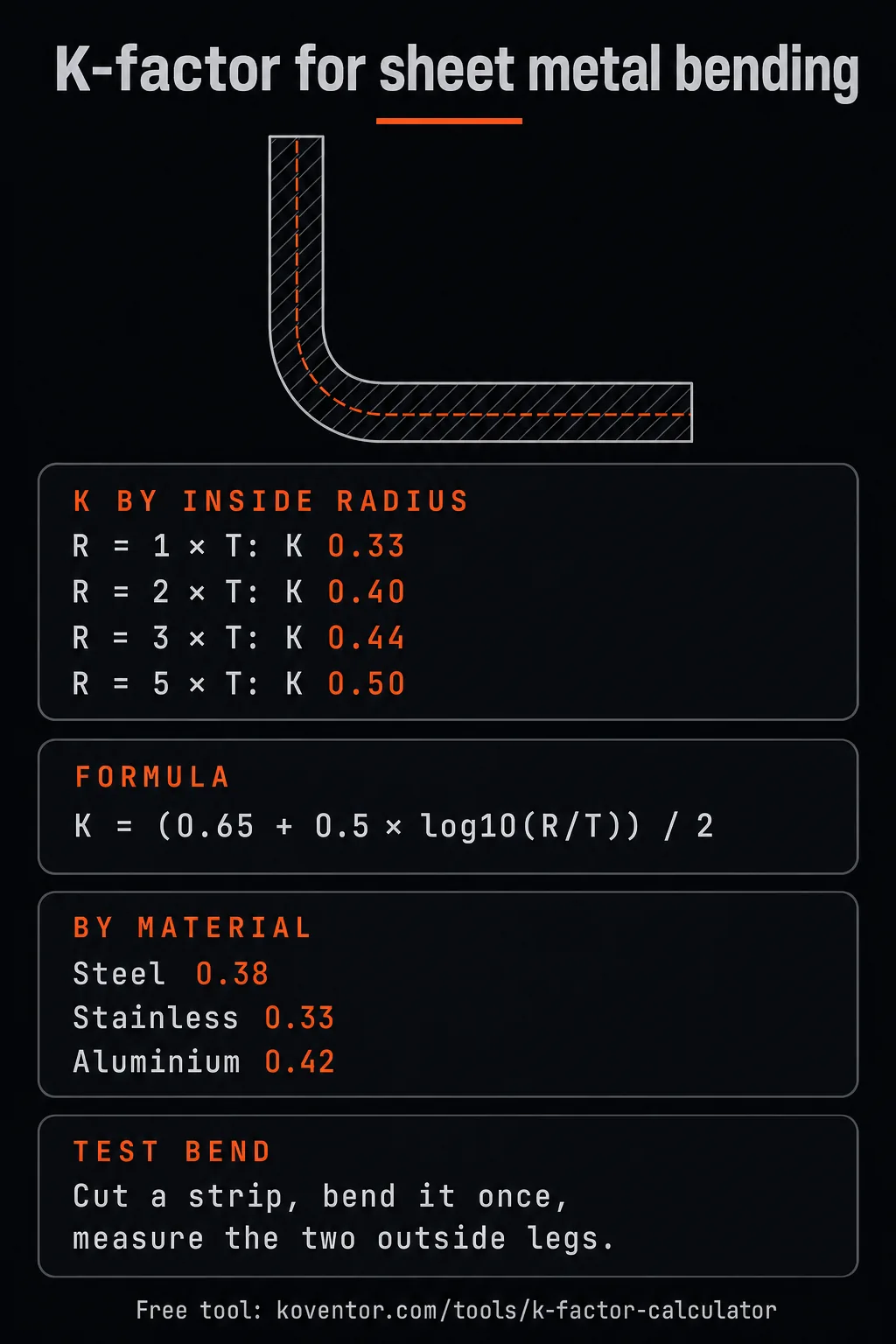
The K-factor says where the neutral axis sits in the thickness of a bend. Measure one test bend and this calculator gives you the K-factor of your material on your tooling. Already know your K? It gives the bend allowance and the bend deduction. Everything runs in your browser, millimetres or inches alike as long as you stay in one unit.
The angle you type
Legs of a bend over 90°, dimensioned
1. Find K from a test bend
Cut a strip, bend it once, measure the two outside legs.
Your K-factor
0.3815
- Bend allowance measured
- 4.34
- Outside setback
- 4
- For comparison: DIN 6935 K
- 0.325
2. Bend allowance and deduction from K
Use a measured K, or a starting value from the tables below. K sits between 0 and 0.5: the share of the thickness where the neutral axis lies, from the inside of the bend.
- Bend allowance (BA)
- 4.3354
- Outside setback
- 4
- Bend deduction (BD)
- 3.6646
Angle typed as the bend angle: 90°, a 90° bend. Outside dimensions, dimensioned to the tangent beyond 90° (DIN 6935). Flat length of an L = outside leg 1 + outside leg 2 − BD. For a profile with several bends, the bend allowance calculator adds them up for you.
Free, kept on this device
Your shop K-factor library
A measured K holds for one material, one thickness, one die and one set of tools. Keep them here with their measurements and calibration date: each K is worked out again from your test bends and checked, then offered in the bend allowance calculator. An assistant prepares a series of test bends, and your spreadsheet imports, in inches or millimetres.
K-factor values, for a first estimate
Indicative values only. Your real K-factor depends on the batch, the grain direction, the punch and the die. Start here, then measure yours with a test bend.
| Inside radius / thickness | K-factor |
|---|---|
| R = 1 × T | 0.33 |
| R = 1.5 × T | 0.37 |
| R = 2 × T | 0.40 |
| R = 3 × T | 0.44 |
| R = 4 × T | 0.48 |
| R = 5 × T | 0.50 |
| R > 5 × T | 0.50 |
Computed from k = 0.65 + 0.5 × log10(R/T), with K = k / 2.
| Material | K-factor |
|---|---|
| Mild steel, galvanised, pre-painted, corten | 0.38 |
| Stainless steel | 0.33 |
| Aluminium | 0.42 |
The values the configurator applies until a workshop replaces them with its own.
| Thickness | K 0.38 | K 0.33 | K 0.42 |
|---|---|---|---|
| 1 mm | 1.83 mm | 1.91 mm | 1.77 mm |
| 1.5 mm | 2.75 mm | 2.87 mm | 2.65 mm |
| 2 mm | 3.66 mm | 3.82 mm | 3.54 mm |
| 3 mm | 5.5 mm | 5.73 mm | 5.31 mm |
| 4 mm | 7.33 mm | 7.64 mm | 7.08 mm |
| 5 mm | 9.16 mm | 9.55 mm | 8.85 mm |
| 6 mm | 10.99 mm | 11.47 mm | 10.62 mm |
The formulas
- Bend allowance
- BA = π / 180 × A × (R + K × T)
- Outside setback, to the apex
- OSSB = tan(A / 2) × (R + T)
- Outside setback beyond 90°, to the tangent
- R + T
- Bend deduction
- BD = 2 × setback − BA
- K from a test bend
- K = (180 × BA / (π × A) − R) / T
T thickness, R inside radius, A bend angle in degrees (90 for an L).
Method, conventions and sources
The calculator follows the convention of DIN 6935 and of CAD software. A is the bend angle: 0° for a flat sheet, 90° for a square bend, 180° for a closed hem. The included angle β between the legs is 180° − A. Legs are dimensioned on the outside.
Up to 90°, each leg is dimensioned to the apex where the outside faces meet. Beyond 90° that apex moves away and goes to infinity near 180°, so the standard dimensions the leg to the tangent to the outside arc, square to the leg. CAD software also offers the apex dimension, which this calculator accepts up to 170°.
Worked example
2 mm sheet, 2 mm inside radius, 90° bend, K = 0.38. Bend allowance: π / 2 × (2 + 0.38 × 2) = 4.3354 mm. Setback: (2 + 2) × tan 45° = 4 mm. Deduction: 2 × 4 − 4.3354 = 3.6646 mm. A 50 × 50 mm angle is cut from a 96.34 mm blank. The other way round, a 96.34 mm blank that gives two 50 mm legs means K = (180 × 4.34 / (π × 90) − 2) / 2 = 0.3815.
Range of validity
- One bend, constant radius and thickness. Bend angle above 0° and up to 180°.
- K above 0 and up to 0.5. Outside that range the calculator refuses: a measured K of 0.7 or −0.1 means a wrong measurement.
- DIN 6935 covers bend angles from 15° to 165°; beyond, the calculator keeps the tangent dimension, as CAD does.
- Uncertainty on K: ± 3 × u × 180 / (π × A × T) for an accuracy u on each of the three lengths.
Sources
- Standard: DIN 6935, cold bending of flat steel products (paid text, not read). Formulas, opening angle and dimensioning from the German Wikipedia article « Biegeverkürzung », read on 26/11/2026.
- CAD convention: SOLIDWORKS help, « K-Factor » and « Bend Allowance and Bend Deduction »: BA = π (R + K T) A / 180, K = t / T.
- Shop rule: the cap k = 1 beyond R / T = 5 comes from workshop handbooks; the formula itself reaches 1 there, the neutral axis at mid-thickness.
Frequently asked questions
What is the K-factor in sheet metal bending?+
It is the position of the neutral axis inside the thickness, as a fraction of the thickness. When a sheet bends, the outside stretches and the inside compresses; somewhere in between, a layer keeps its length. K = 0.5 would put it in the middle. In practice it sits closer to the inside, typically between about 0.3 and 0.5.
How do I measure my own K-factor?+
Cut a strip of known length, bend it once at 90° on the tooling you actually use, then measure both outside legs with a caliper. Enter the flat length, the two legs, the thickness, the inside radius and the angle in the calculator above: it returns the K-factor of that material on that tooling. Type the accuracy of your measurements (0.05 mm with a caliper) and it also gives the uncertainty on K: on 2 mm sheet bent to 90°, 0.05 mm per measurement already moves K by 0.05. Repeat for each material and thickness you bend often.
What is the difference between K-factor, bend allowance and bend deduction?+
The K-factor places the neutral axis. The bend allowance is the length of that neutral axis through the bend. The bend deduction is what you subtract from the sum of the outside dimensions to get the flat length. All three describe the same bend; the calculator gives the three at once.
Why does the K-factor change with the inside radius?+
On a tight bend, the material is compressed hard on the inside and the neutral axis moves inward, so K drops. On a large radius the bend behaves more like a gentle curve and K moves toward 0.5. That is why a single K per material is an approximation: it holds for the radius and tooling it was measured on.
Are the values in the table exact?+
No, they are indicative. The real K-factor depends on the material batch, the grain direction, the punch radius and the die opening. Use the table to start, then measure your own with a test bend and keep that value.
Which K-factor does Koventor use?+
The configurator applies 0.38 for steel, 0.33 for stainless and 0.42 for aluminium by default, and the workshop can replace them with its own measured values. With Koventor's compensated flat length, the DXF and the bend sheet come out with the flat length worked out this way. A workshop can also keep its own convention, the plain sum of the dimensions: it is a setting.
Bend angle or included angle: which one do I type?+
Either, as long as you say which. The bend angle is 0° for a flat sheet, 90° for a square bend and 180° for a closed hem. The included angle, between the two legs, is 180° for a flat sheet and 90° for a square bend: included angle = 180° − bend angle. The formulas work with the bend angle.
Why is a K-factor above 0.5 refused?+
Because in a bend the inside compresses and the outside stretches: the layer that keeps its length cannot sit in the outer half of the thickness. A measured K above 0.5, or below zero, points to a wrong measurement of the flat length, a leg or the radius. That is the useful information, not a result.
Going further
Your K-factors, applied to every quote
Koventor works out the flat length with your own K-factors, then sends you the quote, the cut-ready DXF and the bend sheet. Nobody redraws the part.
With this free tool
- Your real K-factor from one test bend, then the bend allowance and deduction.
- The calculation as a PDF.
With Koventor, on top
- Your K-factors are applied to every quote.
- Koventor works out the flat length, then sends you the quote, the cut-ready DXF and the bending sheet.
- Nobody redraws the part.