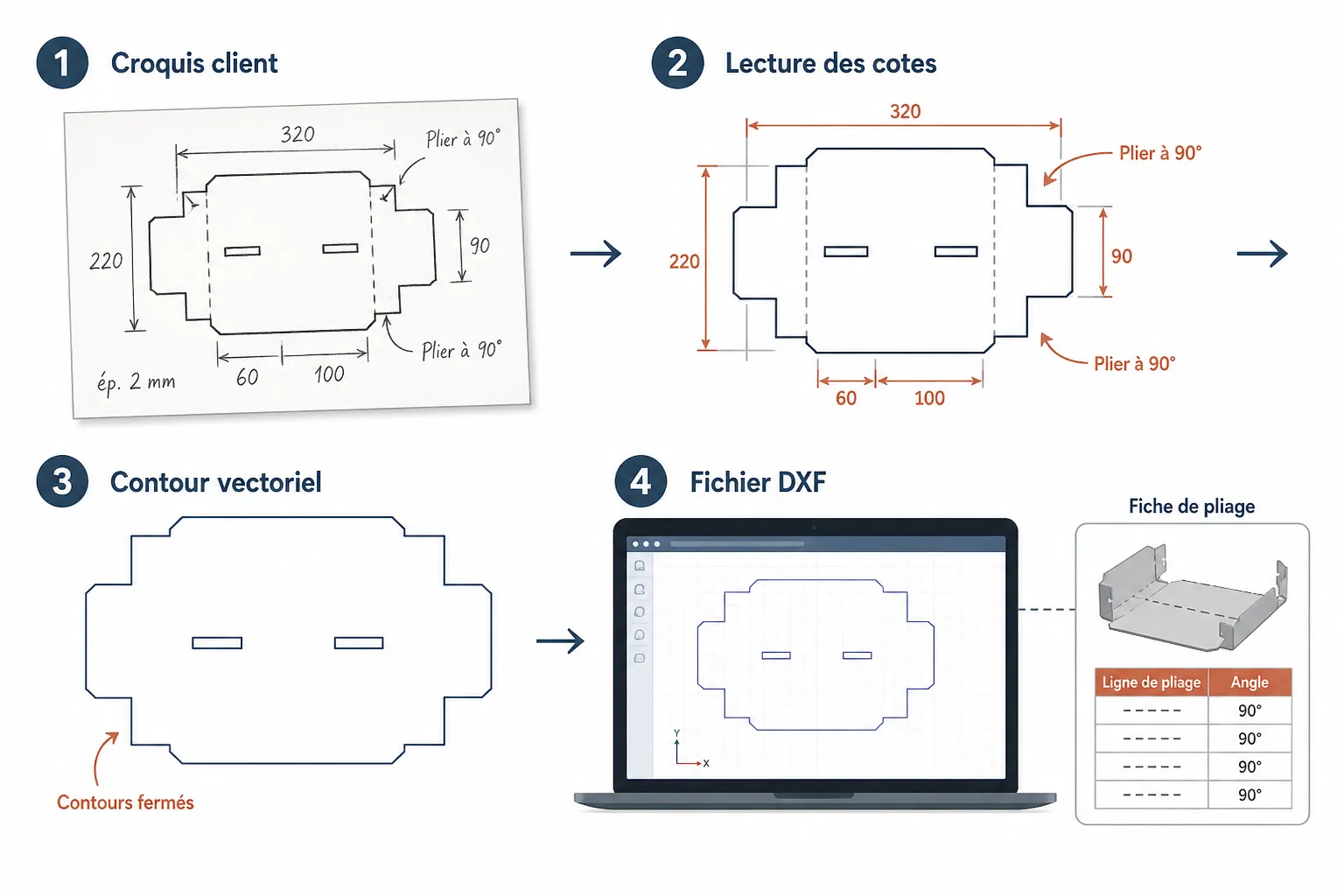
In short: a DXF file is the standard vector format that laser cutting machines and CAM software read. If a customer sends you a paper sketch, you have to convert it to DXF before you can machine anything. Here is how it works, where it jams, and what you can do to go faster.
What a DXF file actually is
DXF stands for Drawing Exchange Format. Autodesk created it so drawings could move between CAD packages. Today it is the universal format for laser, plasma and waterjet cutting.
A DXF file contains geometric entities: lines, arcs, polylines, circles. No images, no pixels. That purely vector nature is what lets the machine follow the path to a tenth of a millimetre. A JPG or a scanned PDF does not go straight onto a laser cutter.
DXF is not one fixed format. There are several versions, tied to AutoCAD releases. In practice most machines read the common versions without trouble. But a corrupt file, or one saved in too recent a format, can throw import errors, especially on older controls.
Why a customer sketch is never enough as it stands
The customer draws on paper, often freehand, sometimes with approximate dimensions. They send you a photo of the sketch or a scanned PDF. Useful for understanding intent, unusable directly in production.
The classic problems you know well:
- The dimensions are legible but the angles on the drawing are not accurate.
- Bend radii, assembly clearances and tolerances are missing.
- The customer drew in perspective, not as a flat pattern.
- Dimensions are given in millimetres but the drawing is not to scale.
Before producing a DXF you have to interpret the sketch, fill the gaps and apply your workshop's constraints. That is where the estimator's time goes, usually far too much of it.
When there is no drawing office to clean it up, these reading reflexes for custom sheet metal quotes help.
The three ways to get a DXF from a sketch
There are three routes, depending on your setup and the volume of enquiries you handle.
1. Redraw it in CAD. You reopen AutoCAD, FreeCAD or SolidWorks and retrace the part by hand, entering the sketch's dimensions. It is reliable, but slow. For a simple part, a quarter of an hour minimum. For a complex part with several bends, far more.
2. Use automatic vectorisation. Some software tries to convert a scanned image into vectors. The result is rarely usable directly in sheet metal work. Lines are not closed, dimensions are not carried through, bending constraints are absent. You spend as long correcting as you would redrawing.
3. Use a configurator that reads the sketch and generates the DXF automatically. That is what Koventor does from a sketch sent by the customer. The system reads the dimensions, applies the workshop's constraints, and produces a ready DXF with the bend sheet. It is the fastest route for workshops receiving many varied enquiries.
In Koventor, the approved outline becomes a cut-ready DXF that nobody has to redraw.
What a good DXF must contain for cutting and bending
A DXF arriving at your cutting station has to meet a few non-negotiable rules.
- Closed contours. No overlapping segments, no micro gaps. Otherwise the machine loops badly or stops.
- No duplicates. Two lines on top of each other and the head passes twice. That burns the part.
- A clear unit. Whichever unit your workshop works in, it has to be stated and consistent. A file drawn in inches and imported as millimetres is scrap, and so is the reverse.
- Separate layers where needed. Cutting on one layer, engraving on another, bend lines marked on a third. Every workshop has its own convention.
For bending, the DXF alone is not enough. It has to come with a bend sheet giving the bend order, the angles and the direction. See how Koventor handles concrete workshop cases to understand what that changes in practice.
A badly prepared DXF costs more to fix than a sketch redrawn from scratch. A simple rule, and plenty of estimators learn it the hard way.
What actually wastes time
The real problem is not technical. It is the back and forth with the customer. You receive the sketch, you ask questions, the customer answers three days later, you redraw, they change their mind about one dimension.
The second problem is scatter. One sketch arrives by email, another by messaging app, a third is a blurred photo of a sticky note. Each time you have to rediscover the context, the material, the workshop constraints.
Standardising how sketches arrive saves more time than optimising DXF generation ever will. If you do not yet have a clear process for receiving and qualifying incoming enquiries, that is the first job.
My view
The DXF question is usually presented as a technical problem. It is not. Tools to produce a correct DXF have existed for a long time. The real problem is how long it takes when you do it by hand for every enquiry.
My advice: measure how many hours a week your estimator spends transcribing sketches into usable files. If it is more than half a day, the subject deserves a proper look at your process.
A workshop that cuts that transcription time gains responsiveness, and responsiveness is what brings a customer back. Not price.
Common questions
Can a customer supply a usable DXF directly? Yes, if they work in CAD and know how to export properly. In practice, DXFs supplied by non-specialists are often malformed: wrong units, open contours, duplicates. Always check before releasing.
What is the difference between DXF and DWG? DWG is AutoCAD's native, proprietary format. DXF is the open exchange format. Most machine tools and nesting software read DXF. Some also read DWG, but DXF remains the safe bet for interoperability.
Can you generate a DXF from a photo of a sketch without going back through CAD? Yes, that is what recent tools do when they combine sketch reading with an automatic generation engine. The condition is that the dimensions are legible and that the workshop's constraints are built into the system. Without that, the generated file still needs checking by hand.