Free tool
Sheet metal flat pattern generator, with the DXF
Pick an L, U, Z or hat profile, enter its outside dimensions, the thickness and the inside radius. You get the flat length, the position of every bend line, and the flat blank as a DXF for your laser, with the bend lines on their own layers.
Flat length
172.67 mm
Blank 172.67 mm × 1,000.00 mm, 2.71 kg
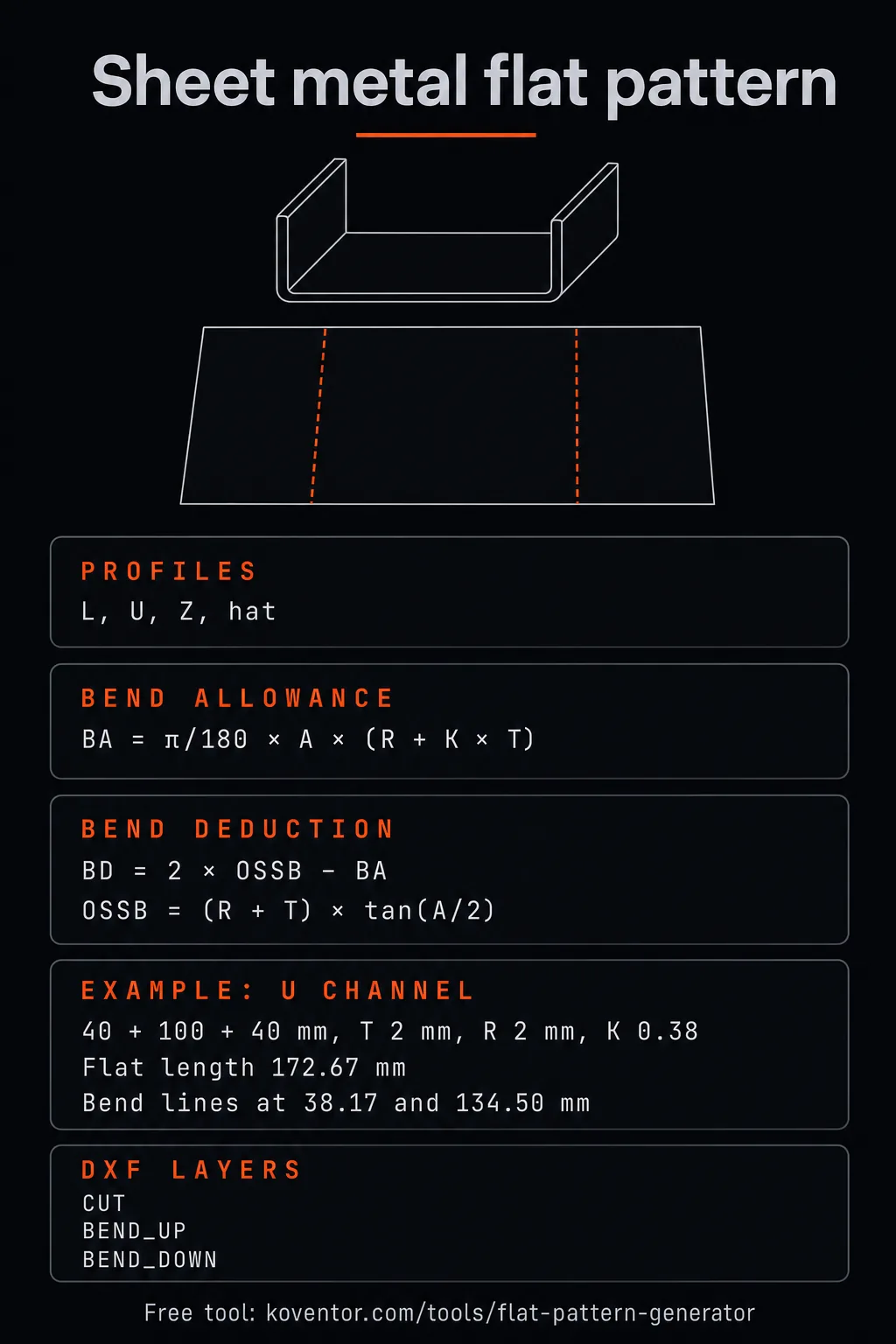
The section, then the flat blank with its length shortened to fit. Orange dashes bend one way (BEND_UP), blue dashes the other (BEND_DOWN).
| Bend | Position | Layer | BD |
|---|---|---|---|
| 1 | 38.17 mm | BEND_UP | 3.66 mm |
| 2 | 134.50 mm | BEND_UP | 3.66 mm |
Several parts: flat patterns in batch
Paste your table, copied from Excel or a CSV, or import the file: one row per part. Each part is worked out with the same formulas and K-factors as above. The DXF of each part stays free; the whole batch is yours for your email address.
Your browser reads the table: neither the file, nor its dimensions, nor your part numbers are sent to me.
Columns recognised: part number, profile (L, U, Z, hat), outside dimensions (30x60x30), thickness, material, quantity, bend length, angles, inside radius, K-factor, bend directions (up/down). A missing column takes the setting below.
How the flat length is worked out
Bend allowance
BA = π / 180 × A × (R + K × T)
The length of the neutral fibre through the bend: what the bend actually uses on the blank.
Bend deduction
BD = 2 × OSSB − BA
OSSB = (R + T) × tan(A / 2) up to 90°. Subtract one BD per bend from the sum of the outside dimensions.
Bend lines
middle of each bend zone
Positions are measured from the left edge of the blank and written in the PDF, bend by bend.
Frequently asked questions
How do you calculate a sheet metal flat pattern?+
Add the outside dimensions of the flanges, then subtract one bend deduction per bend. The bend deduction is 2 × OSSB − BA, with the outside setback OSSB = (R + T) × tan(A / 2) and the bend allowance BA = π / 180 × A × (R + K × T). The generator runs that for you and also places each bend line.
Where are the bend lines on the flat blank?+
In the middle of each bend zone. Their positions are measured from the left edge of the blank and listed under the drawing, so the setter can check them with a rule.
Which K-factor should I use?+
Start with the configurator's values (Koventor deducts the bend allowance by default; a shop can set it otherwise): 0.38 for mild and galvanised steel, 0.40 for S355, 0.33 for 304 stainless, 0.42 for aluminium. For a flat that fits first time, measure your own with one test bend in the K-factor calculator and type it in.
What do the BEND_UP and BEND_DOWN layers mean?+
Bends that go one way are on BEND_UP, bends that go the other way on BEND_DOWN: an L or a U has only one kind, a Z has one of each, a hat section two of each. The outline is one closed polyline on CONTOUR. The bend lines are dashed on their own layers, so your CAM can keep them off the cutting path. These are the layer names of Koventor's flat DXF, and the file is the same, byte for byte, as the one koventor.fr writes for the same part.
Can I get the flat patterns of several parts at once?+
Yes, below the generator: paste your table from Excel, or import it as a CSV or an Excel file, one row per part with its part number, profile, dimensions, thickness, material and quantity, in millimetres or inches. Every flat blank is worked out with the same formulas, and the DXF of each part downloads freely. The archive of the whole batch, with the DXF files in the layer convention you pick, the Excel parts list and the fabrication sheets, is yours for your email address.
Is the DXF ready for my laser?+
It is an R12 DXF in millimetres, the oldest and most widely read version, with the outline as four lines and the bend lines on separate layers. Check the result against your own tooling before a run: the flat length depends on the K-factor and inside radius you entered.
Why does the generator warn about a short flange?+
Two cases. Either the flange is shorter than the bend takes up, and there is nothing straight left. Or it is shorter than about half the V die plus the thickness, and the sheet would slide into the die instead of bending.
Going further
Any profile, with your K-factors, straight to the DXF
With Koventor your customer draws any profile or sends a photo of the sketch. The flat length uses your factors, the part is checked against your constraints, and the approved outline comes out as a DXF and a bending sheet, with no redrawing.
With this free tool
- The flat pattern of an L, U, Z or hat profile, with its bend lines.
- The DXF to download, and the dimensions as a PDF.
With Koventor, on top
- Your customer draws any profile, or sends a photo of the sketch: dimensions and angles are read.
- The flat length is worked out with your factors, and the part is checked against your shop's constraints.
- The approved outline comes out as a DXF and a bending sheet, with no redrawing.