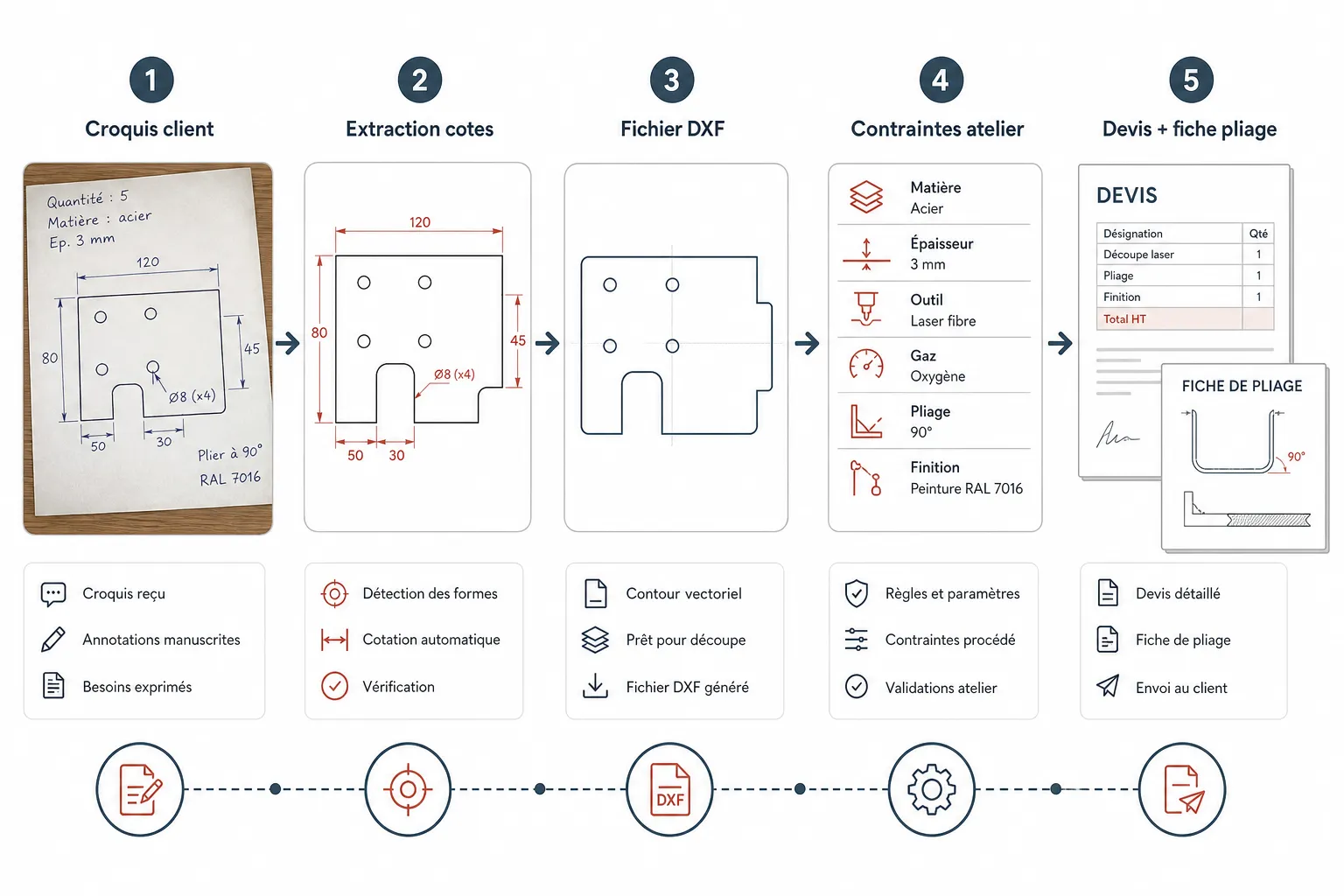
In short: turning a customer's sketch into a laser cutting quote means reading the part, extracting the dimensions, applying your workshop constraints, then laying out the document. Manual retyping is the bottleneck. There are ways around it that do not mean changing your whole process.
The sketch arrives at four on a Friday afternoon. The customer wants a price for Monday. The drawing is scanned crooked, the dimensions are handwritten, some are missing. You know this moment. You also know that if you take too long, they will go elsewhere. That is where method counts.
Why a customer sketch costs so much time
A sketch is not a drawing. It has no layers, no reliable scale, no standard format. Every customer draws their own way. Some send a blurry photo of a paper napkin. Others send a PDF scanned at an angle with dimensions crossed out and rewritten.
The real problem is not reading the sketch. It is what comes after: retyping every dimension into your CAD by hand, rebuilding the geometry, checking the bend angles, working out the flat length, then typing it all again into your pricing tool. Every retype is a source of error and a measurable loss of time.
And when a dimension is missing, you have to call the customer back, wait for the answer, then start again. The laser cutting quote that should take twenty minutes often takes two hours.
Multiplied over a week, this is how long quoting sheet metal really takes.
Reading a customer sketch: what everyone forgets to check
Before touching anything, ask four questions of every sketch that arrives:
- Is the material stated, with its thickness?
- Are tolerances given, or do you apply your own standards?
- Are the bends annotated with direction and angle?
- Are there tapped holes, countersinks or finishes to price in?
What experienced estimators know: a customer who names a material without naming the grade can make you redo the whole quote if you pick the wrong one. Ask before, not after you have priced it. An incomplete sketch approved too quickly costs more than a quote returned a day late.
Another classic trap: symmetrical parts. The customer draws one side and you assume the other matches. It does not always. Check.
For plain cutting jobs, see also custom sheet metal quotes without a drawing office.
The no-retyping method, step by step
Zero retyping does not really exist yet in every workshop. But you can get close. Here is how to structure the flow to limit manual entry:
- Step 1: standardised intake. Ask the customer for a minimum format: a sharp photo in daylight, or a straight scan. Build an email template carrying that request. You will save time from the moment it arrives.
- Step 2: extracting the dimensions. If you use a tool that reads the sketch automatically, let it make the first pass. Otherwise annotate the PDF directly with a markup tool before typing anything.
- Step 3: generating the DXF. The geometry has to come straight out of the annotated sketch, without redrawing from scratch. This is where the time is won or lost.
- Step 4: applying workshop constraints. Your bend allowance, your minimum radii, your tool clearances: these parameters must be set once and for all, not recalculated on every quote.
- Step 5: producing the quote. The price comes from the material, machine time and margin parameters you defined. No unit prices typed in by hand.
This flow works in workshops of every size. What changes is the tool used at each step. Some do everything in a spreadsheet and standard CAD. Others automate steps 2 through 5.
In Koventor, the customer can also describe the part with voice input.
Building your workshop constraints into the quote
This is the step estimators underestimate. Your workshop has its own constraints: the usable width of your laser, its power, cutting speeds by material and thickness, the bending tooling you actually own. If those parameters are not built into your pricing method, you are producing quotes that do not reflect your production reality.
An accurate laser cutting quote is one calculated with your machine parameters, not with market averages.
The same point applies to the bend sheet. If it does not match your real tooling, the operator receives instructions they cannot follow. The result: back and forth, remade parts, an unhappy customer. The sheet has to come out of the same flow as the quote, not be written separately. If you want to see how this kind of flow applies concretely to your workshop, a demonstration on your own sketches usually says more than a general explanation.
What the customer actually wants from the quote
The customer sending a sketch is not always a trained draughtsman. They want three things: a price, a lead time, and the certainty that you understood their part.
So the quote has to carry a representation of the part as you understood it, not only price lines. If you return a DXF or a preview of the flat pattern with the quote, the customer sees immediately whether you read their sketch correctly. That prevents unpleasant surprises at delivery.
A quote that shows the interpreted part builds trust and reduces disputes. It is also a differentiator against competitors who send a bare amount on a blank PDF. On the configurator's home page you can see what this kind of flow actually produces, from sketch to final document. The sketch-to-quote configurator gives a precise idea of the result.
Being able to see the bent profile in 3D before ordering answers a lot of their questions.
My view
Manual retyping is not inevitable. It is a habit. And like every workshop habit, it costs something, even when nobody adds it up.
My advice: start by mapping where you lose time on a typical quote. Is it reading the sketch? Creating the DXF? Working out the price? Laying out the document? Every workshop has its own bottleneck. Solve that one first, before trying to automate everything.
The quickest gain is usually standardising how customer sketches arrive, before you touch any software at all. An email template, a requested format, a checklist of required dimensions: an hour to set up, and it changes the estimator's day from the following week.
Common questions
Can you quote laser cutting without a DXF? Yes, but with a risk. Without a geometry file you are pricing your own interpretation of the sketch. If that interpretation is wrong, you absorb the difference in production. The DXF remains the common reference between you and your machine.
How do you handle missing dimensions on a customer sketch? Do not invent them. Flag them explicitly to the customer with a precise list of what is missing. A structured email listing the expected dimensions works better than a phone call, because it leaves a record and forces a complete answer.
Do you need specialist software, or is a spreadsheet enough? A spreadsheet is enough up to a certain volume and a certain complexity. When the number of quotes per week climbs, or when parts are regularly complex, the spreadsheet's limit shows quickly in errors and response times. The choice depends on your real workload, not on a general rule.