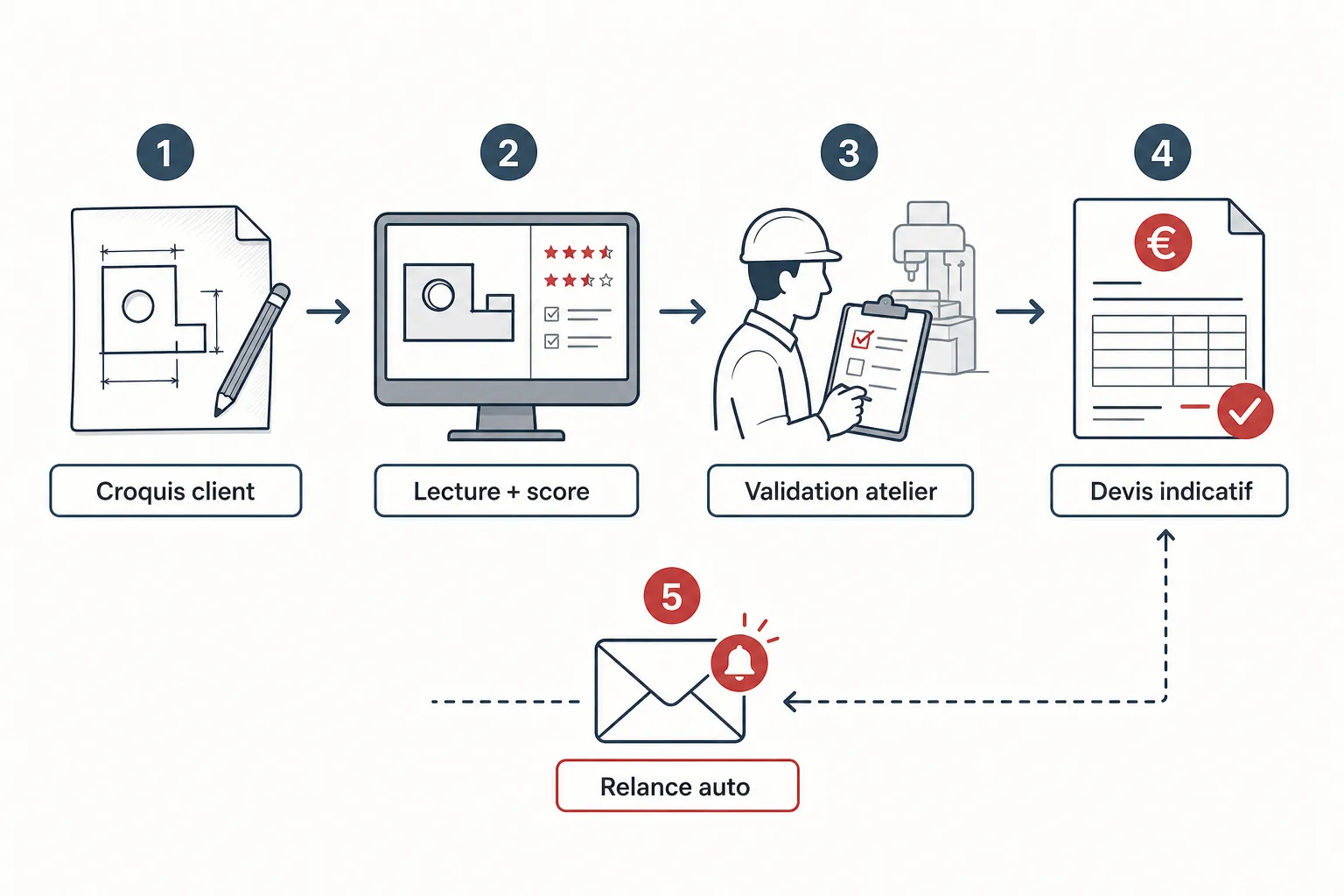
A customer sends you a photo of a sketch drawn in pen on an A4 sheet. The dimensions are there, more or less legible. They want a price "just to see." You know what that costs in time: decoding the drawing, asking questions, digging out your material grid, estimating cutting and bending time, writing the quote, sending it. Forty-five minutes for a quote that has a one-in-three chance of closing. So when someone talks to you about automating this, your first instinct is the right one: show me how, concretely.
Is a hand-drawn sketch really that hard for a machine to read?
Yes. Let's be direct. A drawing from CAD software, with clean layers and metadata, is a largely solved problem. A freehand sketch is another story. Handwriting varies from one customer to another. Dimensions are sometimes placed loosely, sometimes duplicated, sometimes forgotten. A leader arrow can point to a tolerance or to a material note — the machine doesn't always figure that out.
What modern optical recognition systems can do is identify geometric shapes, extract numerical values and associate them with segments. On a clean sketch, with explicit dimensions and a legible legend, the correct-read rate is acceptable. On a sketch scribbled in a meeting or photographed at an angle with a smartphone, the errors multiply. No honest person will tell you otherwise.
That's precisely why Koventor introduced a confidence score on the reading of each sketch. If the tool isn't sure of a dimension or a material indication, it doesn't choose at random: it flags the uncertainty and escalates to your team for validation before the indicative quote goes out to the customer. Automation doesn't replace the trade eye; it concentrates it where it's truly needed.
What is an "indicative" quote, and why does this nuance matter?
An indicative quote is a first priced estimate, produced quickly from the available information, and explicitly presented as such to the customer. It's not a contractual quote. The nuance is crucial, as much for you as for your customer.
In the Koventor process, the automatically generated quote is always labeled indicative. It's subject to confirmation by your shop before any firm commitment. This protects you if a dimension was misread, if the material isn't in stock in the right format, or if the geometry implies a bending constraint the sketch didn't make obvious. You stay in control of what goes out under your name.
For your customer, an indicative price delivered in a few hours rather than two days is already an answer. They can move forward in their thinking, consult other suppliers, or come back to you with a more finished drawing. The commercial relationship starts sooner, without you having tied up a technician for an hour of work.
Concretely, how does Koventor handle an incoming sketch?
The customer submits their sketch — photo, scan, PDF — via an online form connected to your quoting configurator. The tool analyzes the image: it tries to extract the dimensions, the unfolded geometry, the material and thickness indications. For each extracted element, a confidence score is assigned.
If confidence is sufficient across all the critical parameters, an indicative quote is generated and put on hold for your validation. If one or more elements exceed the uncertainty threshold — an illegible dimension, an ambiguous material — the case is immediately flagged to your team with a precise indication of what's problematic. You don't have to re-read the whole sketch: you know exactly where to look.
Once you've validated it, the indicative quote goes to the customer. If they don't respond within the timeframe you've configured, an automatic follow-up is sent in your name. The customer can unsubscribe from these follow-ups at any time — that's non-negotiable, to stay within the rules and respect your customers. You can review the complete configurator logic on the dedicated page: /configurateur-devis-tolerie.
What kinds of parts suit this approach well, and which remain problematic?
Simple flat laser-cut parts, with few secondary operations, are the best candidates. A sketch with a contour, two or three holes and a clearly noted material thickness: extraction is reliable, the calculation is direct.
It gets more complicated with multi-bend parts, especially if the sketch mixes an intuitive 3D view with a partial flat pattern. The customer sometimes draws "what it looks like assembled" rather than "how it's cut flat." The machine doesn't reconstruct a flat pattern from an approximate perspective view — at least not with the reliability you're entitled to expect on a quote. That's where escalation to a technician is systematic.
Parts with specific surface treatments, tight tolerances noted in shorthand, or multi-component assemblies described on a single sketch also require human intervention. Automation doesn't claim to cover everything. It targets what represents a significant share of your incoming requests: the common, repetitive parts where you already know your pricing grid applies directly.
Does it really change anything for a mid-sized shop?
The honest question to ask is the opportunity cost. How many incoming requests go unanswered for more than 48 hours because your technician is on the floor or out on a job? How many prospects switch to a competitor simply because they got a price faster?
Partial automation of the first quote doesn't transform your shop. It frees up time on simple requests so your technicians can focus on the complex jobs, the ones that deserve real analysis and carry real margin. It's an organizational shift more than a technological revolution.
For a shop that regularly receives requests from new customers through its website or social channels, the ability to reply quickly with a credible price — even an indicative one — is a real competitive advantage. Not because AI is magic, but because commercial responsiveness is also built on process.
Frequently asked questions
Is the generated quote sent to the customer automatically without me seeing it?
No. In the way Koventor works, the indicative quote is always subject to validation by your team before being sent to the customer. You remain responsible for what goes out under your name.
What happens if the sketch is really illegible or incomplete?
The tool assigns a confidence score to each extracted element. If that score is insufficient on a critical parameter, the case is flagged to your team with a precise indication of the problem. No quote is generated as long as the uncertainty isn't resolved.
Can my customers be followed up indefinitely?
No. Automatic follow-ups respect a frequency you configure, and each message includes an opt-out for the customer. You stay within the bounds of good commercial practice.
Do my customers need a CAD file to use the configurator?
No. The Koventor configurator accepts photographed or scanned sketches. Reading quality depends on the legibility of the document, but the tool is designed to handle imperfect inputs and flag what it can't interpret with certainty.
Is it compatible with my current pricing grid?
Yes. The configurator relies on your parameters: materials, thicknesses, setup times, cutting rate. You define the calculation rules; the tool applies them. No generic grid is imposed in your place.
Can you really call it automation if a human still steps in?
It's partial, acknowledged automation. The goal isn't to remove the human eye, but to bring it in only where it adds value: on ambiguous cases and complex parts. On simple, legible requests, the time saved is real.