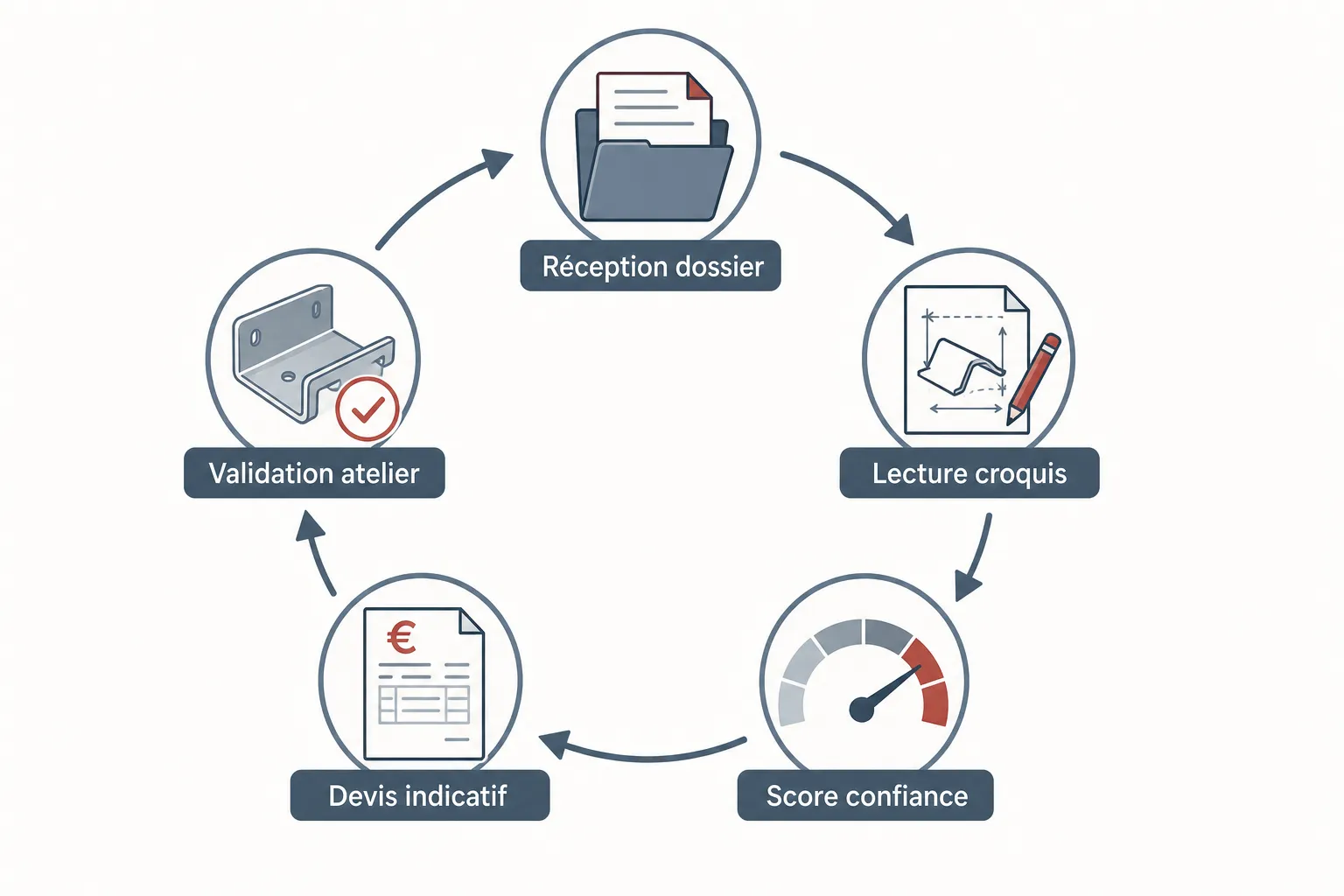
You know it better than anyone: a sheet metal quote request isn't just filling in a "price" box. It's reading an often rough drawing, estimating laser cutting time, calculating material, checking tolerances, and writing a coherent offer — all while knowing the customer expects an answer within the day, sometimes within the hour. Multiply that by the requests coming in every week, and you have a significant share of your estimating department's time, or your own, swallowed up by quoting. Not by production. Not by high-value sales work. By quoting. This article isn't here to sell you a technological dream. It's here to honestly ask the question: is that time well spent, and is there a serious way to cut it without losing control?
Why is manual quoting so time-consuming in sheet metal?
Thin sheet metal and laser cutting have a characteristic many buyers underestimate: every part is potentially unique. A customer sends you a scanned PDF sketch, sometimes hand-drawn, sometimes from CAD software you don't own. Before you can even talk price, you have to interpret that document, extract the useful dimensions, identify the material, guess the thickness if it isn't mentioned, and mentally reconstruct the part's geometry.
Add to that the inevitable back-and-forth: the customer didn't specify the steel grade, the file is illegible, a dimension is missing. Each exchange takes time. And meanwhile, your machine is running, your operators are asking questions, and current orders don't wait.
It's not a competence problem — your teams know how to quote. It's a problem of volume and repetition. Part of this work is intellectually low-value: checking that all the dimensions are there, copying values into a spreadsheet, writing the same terms-and-conditions sentence for the hundredth time. It's this kind of mechanical task you can start to automate, without touching the technical judgment that stays human.
What's the real cost of a manually processed quote?
The cost of a quote isn't just the time spent writing it. It's the whole cycle: receiving the request, checking the file, questions to the customer, calculation, data entry, sending, follow-up if there's no answer, and sometimes correction if an error slipped in. On a simple S235 steel part with a clean drawing, you might get through it in twenty minutes. On a complex part with an incomplete file, you can spend two hours or more.
What people rarely calculate is the opportunity cost. While a qualified person quotes a request that will lead to nothing — because the customer was just price-shopping — they aren't available to support a strategic deal, optimize a process, or answer a loyal customer who does have a concrete project.
There's also the cost of quotes that never get sent or get sent too late. An overloaded shop naturally prioritizes production over pre-sales. The result: some requests go unanswered for days. The customer, meanwhile, has often already contacted two or three competitors. Arriving third with a polished quote sometimes isn't enough anymore.
Can AI really read a sheet metal sketch without getting it wrong?
That's the legitimate question every shop owner should ask before investing in any tool. The honest answer: no, not always, and no serious person will tell you otherwise.
What Koventor does is offer an assisted reading of the document the customer provides — drawing, sketch, PDF — with an associated confidence score. If the reading is clear and the data usable, the system generates an indicative quote. If the document is ambiguous, incomplete or inconsistent, the case is automatically escalated to a human on your team. You keep control of everything that exceeds the reliability thresholds.
The quote produced is explicitly presented as indicative. It must be confirmed by the shop before it becomes binding. It's not a system that decides for you: it's a system that prepares the work so you can decide faster, based on already-structured information.
Concretely, what does Koventor change in a shop's day-to-day?
Koventor is a quoting configurator built specifically for sheet metal and laser cutting. When a customer submits a request — via your website or a dedicated form — the system analyzes the attached file, extracts the available information and generates a first price estimate. That estimate is passed to your team for validation before being sent to the customer.
The system also handles automatic follow-ups: if a sent quote goes unanswered after a delay you define, a reminder is sent to the prospect. Each message includes an unsubscribe link, to stay within a respectful and compliant framework. You no longer have to manually track who replied, who didn't open the quote, who needs a phone call.
The goal isn't to remove the technician who quotes. It's to take away the mechanical part — data checking, formatting, follow-ups — so they can focus their attention on the files that truly deserve it: the complex parts, the important customers, the recurring orders to negotiate.
Is this kind of tool suited to mid-sized shops?
The sizing question is legitimate. A large group has a custom ERP and a team dedicated to price configuration. A very small shop might handle five quotes a week and doesn't have the volume to justify a specialized tool. Koventor addresses what's in between: the sheet metal or laser cutting shop that regularly receives requests, that has one or two people tied up on quoting, and that suffers from load spikes — Monday mornings, quarter-ends, the periods when customers all wake up at once.
It's not a magic tool that erases the complexity of the trade. It's a tool that structures the intake of requests, cuts processing time on standard cases, and frees up bandwidth for what matters. If your shop faces repetitive requests with relatively classic geometries — laser cutting of plates, simple bending, common steel or stainless — the time-saving potential is real.
To go further and see how the configurator works concretely, you can check the dedicated page on our site: the sheet metal quoting configurator will give you a precise view of what the tool can do — and what it doesn't.
Should you be afraid of losing control over your prices?
That's probably the most common objection, and it's understandable. Your pricing grid, your coefficients, your discount terms for loyal customers — all of that represents years of experience and know-how that belongs to you. Handing it to an algorithm, even partially, can feel risky.
Koventor's logic is the opposite: you set the calculation rules, the confidence thresholds, the escalation alerts. The system doesn't improvise pricing — it applies your logic to structured data. And on anything outside the normal parameters, it asks you to validate. You don't lose control; you delegate the repetitive part while keeping the final decision on every quote.
It's no different, in spirit, from what you already do when you train a new employee: you give them rules, you check their work at the start, and you gradually trust them on standard cases. Koventor works the same way, without the training days and without the sick leave.
Frequently asked questions
Is the quote generated by Koventor ready to send directly to the customer?
No. The quote produced is indicative and must be confirmed by the shop before being sent to the customer. It's a validation step deliberately kept in place so you remain responsible for every commercial offer.
What happens if the sketch sent by the customer is illegible or incomplete?
The system assigns a confidence score to each document reading. Below a certain threshold, the case is automatically flagged and escalated to a member of your team for manual handling. No estimate is generated on a document judged too ambiguous.
How does the automatic follow-up system work?
After a quote is sent, if the customer doesn't respond within the delay you've set, an automatic reminder is sent. Each message contains an unsubscribe link. You can configure the number of follow-ups and the delays according to your commercial policy.
Do I have to integrate Koventor with my ERP or current management software?
Integration is possible depending on your environment, but it isn't required to get started. The tool can run independently at first, then interface with your existing systems as needed.
Is Koventor suitable for all types of sheet metal parts?
The tool is particularly effective on requests with relatively standard geometries — laser cutting of plates, simple bending, common materials like steel or stainless. For very complex parts or atypical requests, the system escalates to your team rather than attempting a risky estimate.
How long does it take to set the tool up in the shop?
Deployment depends on your configuration and the level of integration you want. We support each shop through the initial setup — pricing grid, escalation thresholds, follow-up rules — so the tool reflects your way of working and not the other way around.
To see how it gets set up in a shop: the quoting configurator for sheet metal and laser cutting.