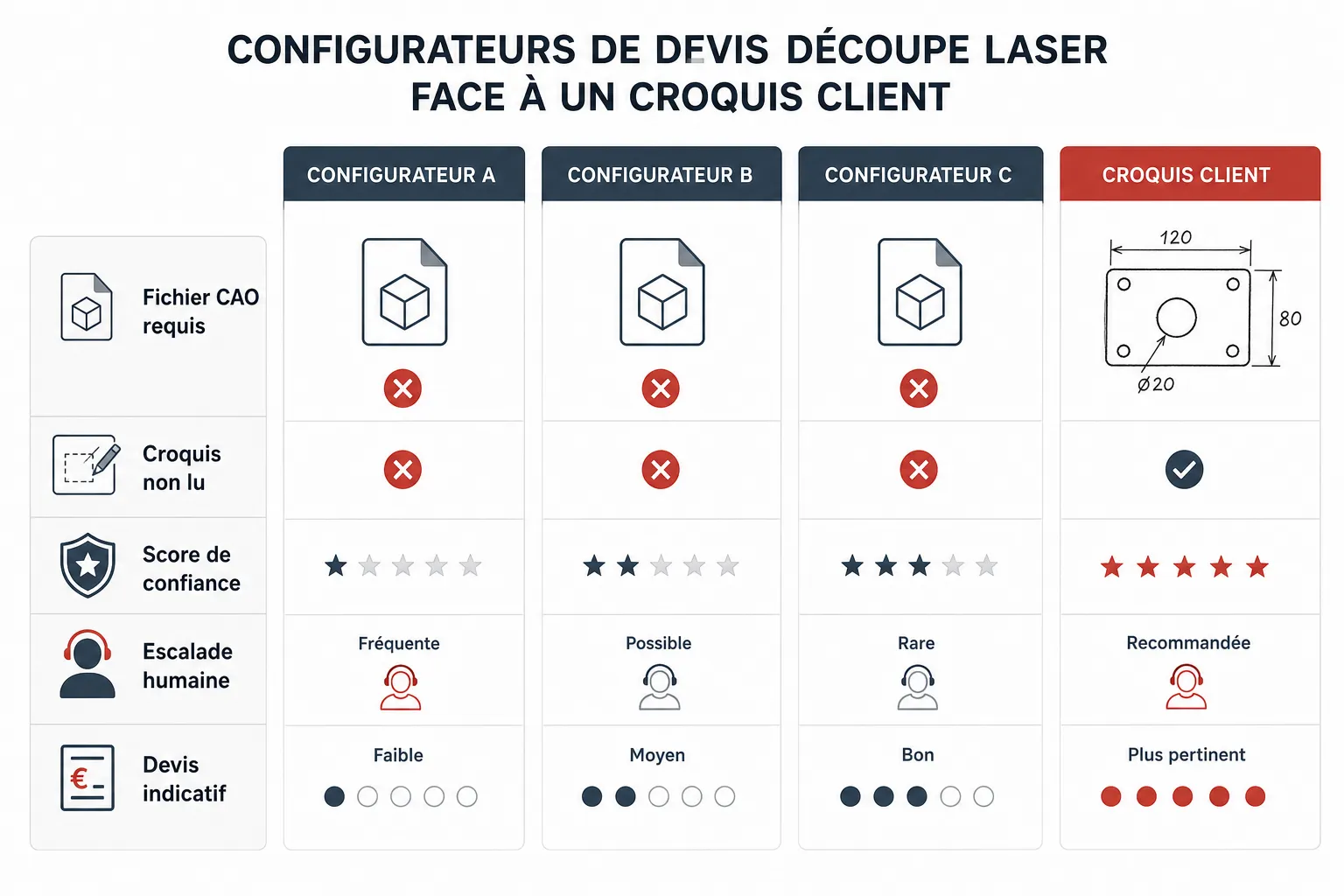
A customer sends you a photo of their sketch scribbled on graph paper. Or a scanned PDF with handwritten dimensions. It happens every day in a sheet metal shop. The question isn't philosophical: it's practical. What do online quoting configurators actually do when faced with this kind of input? And what happens when they can't answer? That's what we'll look at together, with no beating around the bush.
How do these online quoting configurators actually work?
Tempus Tools, ipLaser, Xometry and their equivalents all rest on the same basic principle: the customer uploads a file, the configurator reads that file, calculates a price and returns a quote. Fast, clean, often well designed.
What makes the machine run is the reading of a standard-format file: DXF, DWG, STEP, or at minimum a clean vector PDF. The calculation engine analyzes cut lengths, detects shapes, identifies the selected materials, and produces a number. For a customer who works with an engineering office and delivers correct CAD files, it's smooth.
The problem is that this isn't the case for all your customers. Far from it.
What actually blocks things when a customer sends a sketch?
A sketch — whether photographed, scanned or drawn in Paint — isn't a vector file. It's a bitmap image, a collection of pixels. None of the configurators mentioned reads that natively. The result is systematic: error message, invitation to re-upload a compatible file, or simply silence.
Xometry, which operates at scale and has a very polished interface, is very explicit on this point: the accepted formats are listed, and a paper sketch isn't among them. ipLaser, which targets European shops more, works similarly. Tempus Tools, oriented toward rapid prototyping, also requires a usable vector file.
This isn't a criticism — it's consistency. These tools were built for a specific workflow, the one where the technical file already exists. The problem is that in many artisan or SME sheet metal shops, a significant share of incoming requests doesn't look like that.
What's the real cost of this blocking point for a shop?
When a configurator can't read a sketch, the request falls back on a human being. Someone has to re-read the email, understand the need, redraw or estimate by hand, then call back or reply. In a small shop, that time is often absorbed by the owner or the most experienced technician.
It's not dramatic on a single request. But if a significant share of your incoming requests arrive in non-CAD form — and that's often the case with new customers, tradespeople, carpenters, auto body shops or individuals reaching out for the first time — the accumulation adds up.
The quote is sometimes delivered late, sometimes not delivered at all. Deals are lost without anyone really knowing why. And the customer, meanwhile, has gone elsewhere.
Have these tools planned a fallback for non-CAD inputs?
Honestly: not really, and it isn't their primary purpose. Xometry offers, on certain complex requests, the option of going through a contact form or a manual quote handled by their team. But it's a secondary option, not the core of the product.
ipLaser and Tempus Tools, in their current versions, don't offer an automatic sketch-reading mechanism or intelligent escalation to a human operator. The user ends up alone facing the error message.
This isn't a flaw of these platforms — it's simply a scope. They meet a specific need, and they do it well. The non-CAD sketch is another problem.
What does Koventor do differently on this point?
Koventor is built precisely to handle what classic configurators can't read. When a customer sends a sketch — photo, scan, handwritten PDF — our system tries to read the shapes and the dimensions indicated. For each reading, a confidence score is calculated automatically.
If confidence is sufficient, an indicative quote is generated and sent to the customer. That quote is clearly presented as indicative: it must be confirmed by the shop before it's considered firm. We don't claim to replace a technician's eye on a complex part.
If confidence is too low — because the sketch is illegible, the dimensions absent or ambiguous — the system automatically escalates the request to a human in the shop. That's not a failure of the system, it's exactly what it's supposed to do. In addition, customer follow-ups are automated, with an easy opt-out for those who don't want to be followed up.
Do you have to choose between a classic configurator and Koventor?
Not necessarily — it all depends on your real workflow. If your customers systematically send you clean DXF files, a configurator like Xometry or ipLaser covers your need very well, sometimes with a more polished interface for that specific case.
If part of your requests arrive in unstructured form — sketches, descriptive emails, transcribed phone requests — then the file-format wall is a real daily problem. That's where Koventor is relevant.
Honesty is required here: no tool, Koventor included, turns an illegible sketch into a perfect quote without human intervention. What we do is cut the manual work on the simple, clear cases, and quickly identify the cases that need a human eye. No more, no less.
How can a shop owner assess whether such a tool is worth it for them?
The right question to ask is simple: of the last twenty quote requests you received, how many arrived without a usable CAD file? If the answer is two or three, the subject is marginal. If the answer is ten or fifteen, you have a real reservoir of wasted time to address.
Also look at how many requests received no reply, or a late one. These are often the smallest requests, the ones that seem less urgent — and that end up at the competitor.
You can test the Koventor sheet metal quoting configurator directly on our dedicated page, by uploading the kind of files your customers actually send you. That's the only test that counts: yours, in your conditions, with your real requests. Find the configurator on our page /configurateur-devis-tolerie.
Frequently asked questions
Can Tempus Tools, ipLaser and Xometry read a photographed or scanned sketch?
No. These configurators require a vector or CAD file (DXF, STEP, clean vector PDF). An image sketch can't be interpreted by their current calculation engines. The request has to be handled manually or reformatted by the customer.
Does Koventor guarantee an exact quote from a sketch?
No, and we don't claim it. Koventor generates an indicative quote based on reading the sketch, with a confidence score. If confidence is insufficient, the request is automatically escalated to a human in the shop. The indicative quote must always be confirmed by the shop before being sent as a firm quote.
What happens if the sketch sent is really illegible?
The system detects that the confidence score is too low and escalates the request to a human operator in the shop, with a clear flag. No attempt is made to produce an approximate quote on an insufficient basis.
Can the automatic follow-ups be disabled by the customer?
Yes. Every automatic follow-up sent by Koventor includes an easy unsubscribe option. A customer who doesn't want to be followed up can unsubscribe in one click, without having to contact the shop.
Does Koventor completely replace human verification of quotes?
No, and that isn't the goal. Koventor cuts the manual work on clear, well-documented requests. For complex, ambiguous or high-stakes cases, the technician's or owner's eye stays essential and is built into the process.
Is a classic configurator useless if I have Koventor?
Not necessarily. If your customers systematically send you clean CAD files, a classic configurator may well be enough. Koventor's differentiating value is mainly on non-CAD flows, which are a common reality in SME shops but not universal.